
What are integrated personal and pet profiles?
Integrated personal and pet profiles are a core feature of Petme that let you manage your own profile and your pets’ profiles in one place.
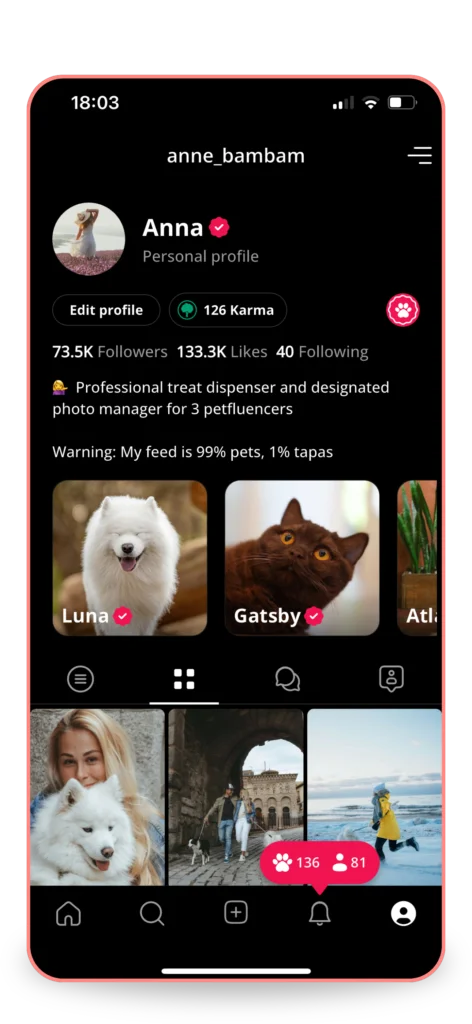
On Petme, you can create a personal profile for yourself and add profiles for each of your pets, no matter how many you have. Each pet gets their own space to shine with posts, photos, and more, while you control everything from a single account. You can post as yourself, as your pet, or as a family, and switch between profiles without hassle.
Here’s how to set up and manage your integrated profiles
-
Create your personal profile
Add your name, photo, and a brief bio after signing up.
-
Add pet profiles
Enter each pet’s details to give them their own space on Petme.
-
Post as yourself, your pet, or both
Select the username(s) you want to use for each post.
-
Edit post ownership anytime
Change who the post is shared from whenever you want.
Integrated profiles also come with features to boost engagement. Family posts let you share a single post across multiple profiles, like a photo of all your pets together, with each profile getting credit. Family likes count a single like for everyone in the post, and family followers allow someone following one profile to easily follow others in your pet family, helping you grow your community.
Petme’s integrated profiles make it easy to manage your pet family while giving each member their own spotlight. For more details, check out this article on our blog.